Usage
Everything you need to know about your day-to-day workflow with PURA — from triggering a review to understanding what comes back.
1. Trigger a review
To start a review, open a pull request and post a comment with /pura review as the very first line. That's it — PURA will pick it up and get to work on that PR right away.
Reviews also start on their own: when a pull request is opened, when new commits are pushed to it, or when it's marked ready for review. Draft pull requests are skipped — see below.
When a pull request opens, PURA pins a PR Overview Comment to it — the single place on the PR that shows the current review state, cumulative totals per agent, and the available commands.
Active account required. Your account must be on an active trial or paid plan — and PURA installed on the repository — for reviews to run. If your trial has lapsed or billing is pending, reviews pause until the account is active again.
2. Reading a PURA review
PURA posts one review per request, consolidating every eligible agent's findings into a single review. Every review contains three things: a short summary of the change, a list of findings each tagged by severity, and a verdict.
Findings come in three severities:
- P1 — must fix: correctness issues, security vulnerabilities, breaking changes, or anything that can cause data loss.
- P2 — should fix: robustness concerns, missing tests, or notable style and performance issues worth addressing.
- P3 — suggestion: polish, alternatives, or nice-to-haves that are entirely optional.
The verdict is one of APPROVE, REQUEST_CHANGES, or COMMENT. Any P1 finding automatically makes the verdict REQUEST_CHANGES; a review with only P2 and P3 findings comes back as COMMENT; a clean review with no findings comes back as APPROVE.
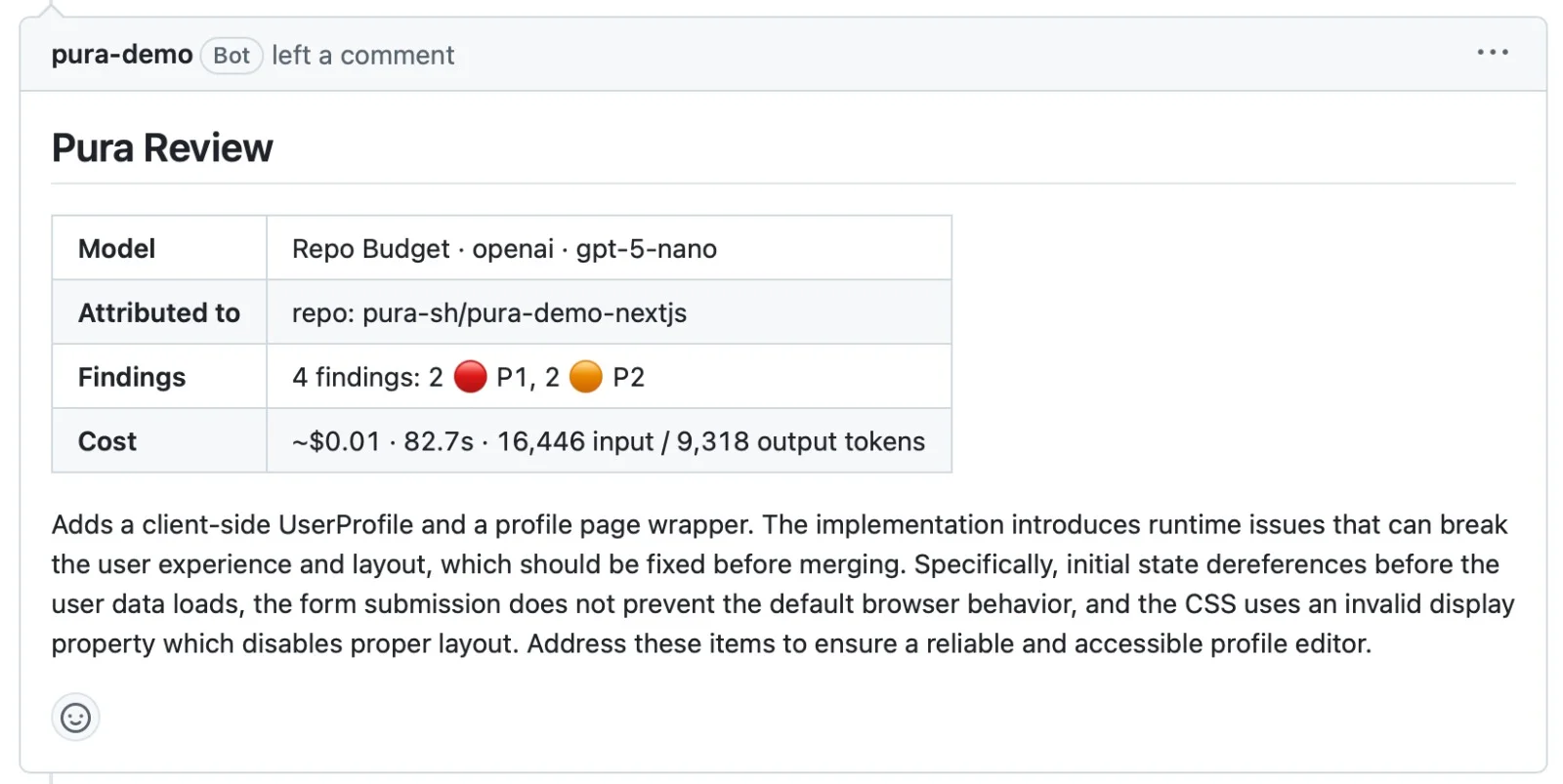
Many findings include a ready-to-apply code suggestion, posted inline on the exact lines so you can accept it directly in GitHub:
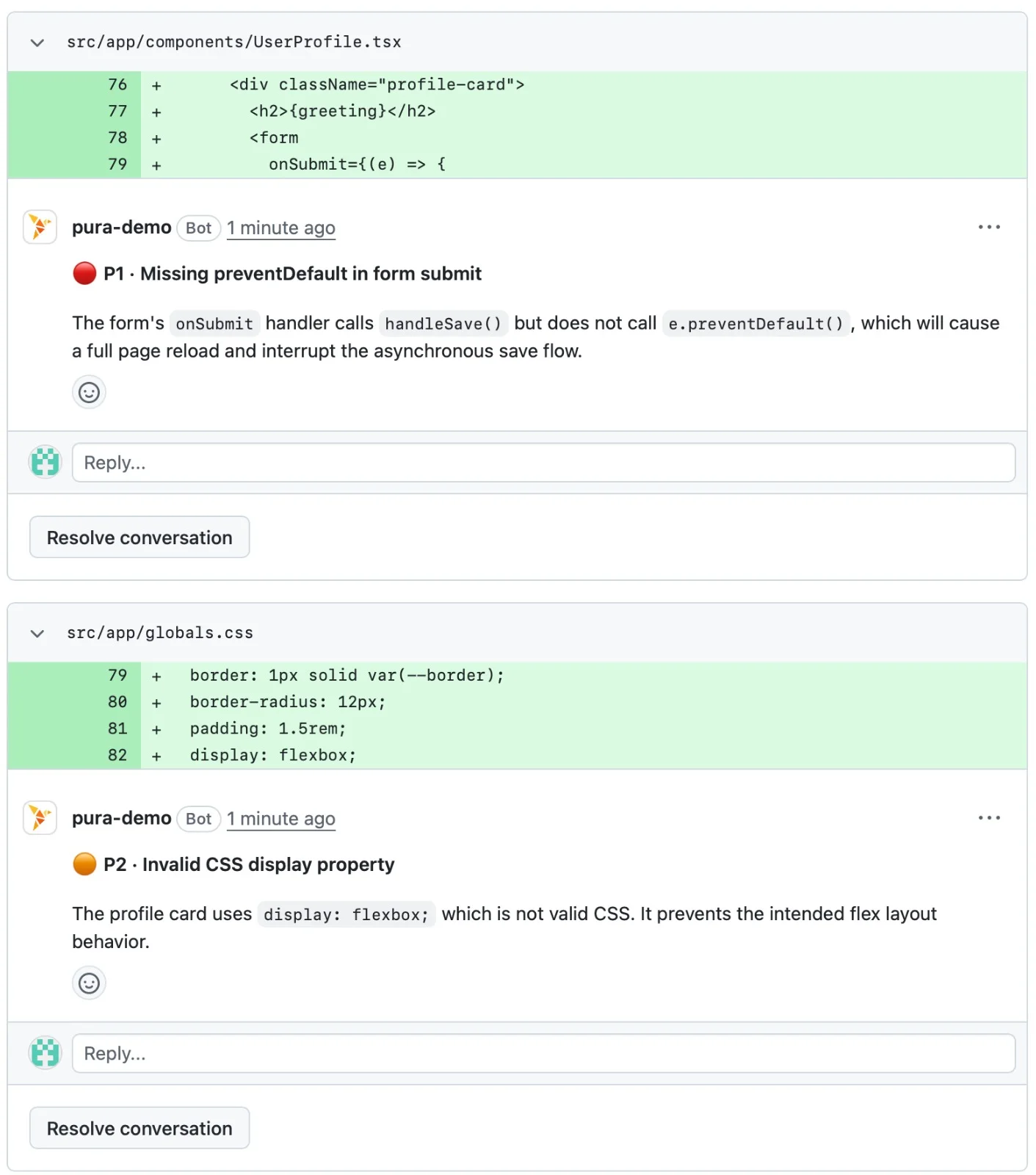
Every finding comment ends with a small Notes footer carrying its id and the mute commands — see Ignoring findings for everything you can do with them.
The PR Overview Comment tracks every run: its ## Current State section shows the latest summary, per-agent findings/cost/tokens, and the derived verdict; the Total section shows cumulative per-agent sums for the PR; and the Ignored Findings list records what's been muted for this PR.
PR hygiene on autopilot. Add a PR Quality Review agent and every run also checks the PR's title, description, labels, and commit messages. Missing or empty titles and descriptions are reported in the overview comment's PR Quality Review section, each with its own id you can ignore.
3. Ignoring findings
PURA stops re-reporting a finding when you tell it to. Finding ids live in each comment's Notes footer and in the overview comment's PR Quality Review section:
/pura ignore— reply to a finding comment to mute it for this PR. Anyone can do this./pura ignore always— reply to a finding comment to mute it for all PRs (repository admins). Remove a permanent mute later with/pura unignore <file>./pura ignore <id> ...— comment on the PR to mute specific findings by id for this PR — including quality findings, which have no thread to reply to./pura ignore always <id> ...— the permanent version, by id (repository admins)./pura ignore(bare, no ids) — a repo admin disables PURA for the PR entirely: open findings are resolved and auto-reviews pause. A manual/pura reviewstill works and reactivates the PR.
Mutes for a PR are listed in the overview comment's Ignored Findings section; permanent mutes apply across all PRs immediately. PURA never re-reports a muted finding — even if the code moves to a different line.
4. Drafts and skips
PURA skips draft pull requests. The overview comment still appears on a draft, so the PR is ready the moment you mark it ready for review in GitHub — PURA picks it up automatically, no comment needed.
Comments posted by the PURA bot itself are always ignored — so PURA will never accidentally review its own output.
5. Re-running a review
Pushed new commits and want a fresh look? Just comment /pura review again — or push, and PURA re-reviews automatically. Each run reviews the latest state of the PR, so you always get feedback on what's actually in the branch right now.
Re-reviews converge instead of duplicating: findings that still stand are kept on their threads, ones that are fixed are resolved, and already-reported findings aren't re-posted. Every run posts a fresh overview with the updated summary and verdict — and when the last open finding is resolved, PURA approves, so a stale “changes requested” can't keep blocking the merge.
Reviews are cumulative. PURA never dismisses an earlier review — the review threads carry the state forward, and each new run moves them toward the final state of the PR.