Per-Repository AI Review Budgets for Multi-Repo Orgs
Give every repo its own review allowance — production services get premium, internal tools stay lean.
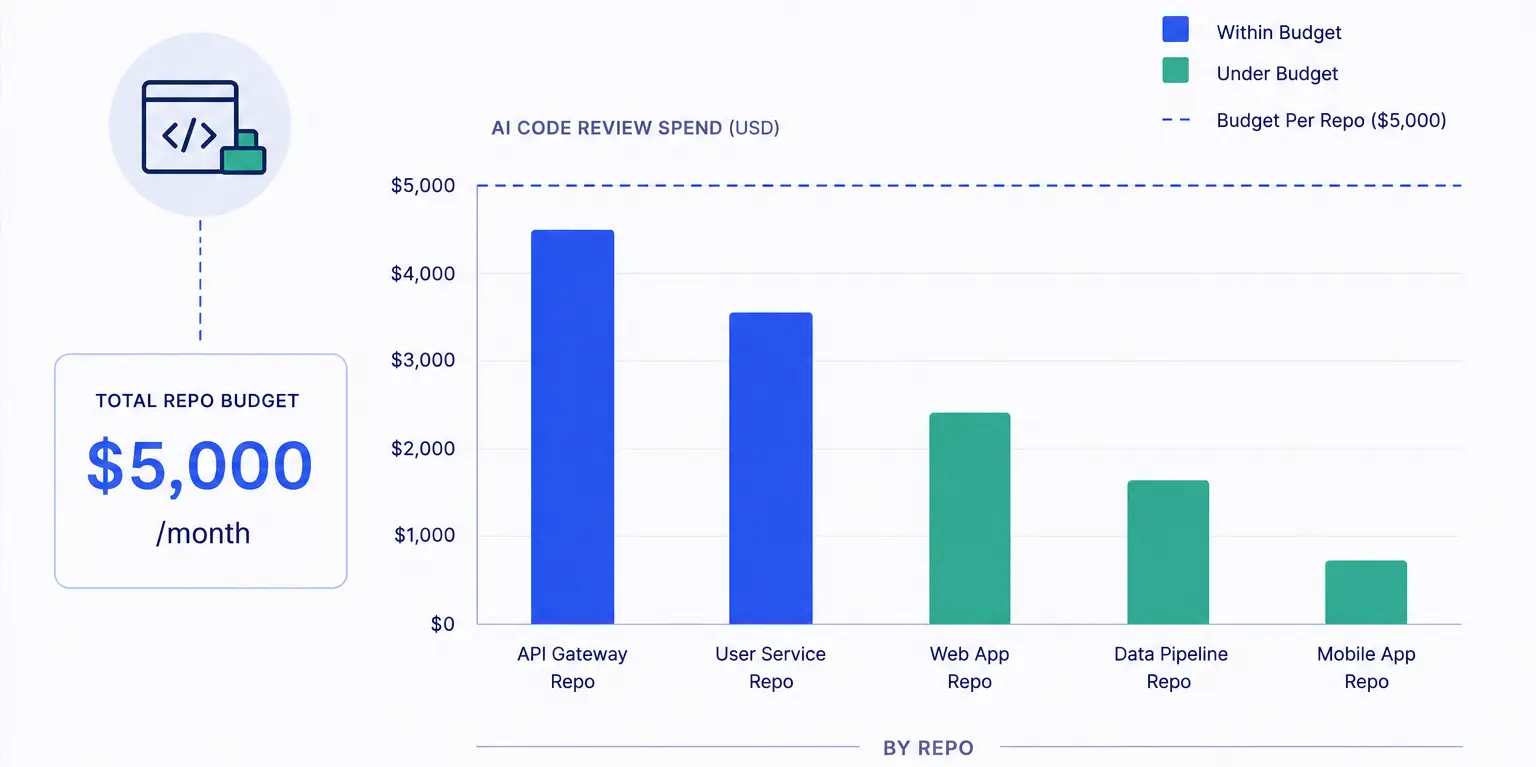
Not all repos are equal. Their budgets shouldn't be either.
Pick any engineering organization with more than ten repositories and you'll find a hierarchy that nobody wrote down but everyone understands. At the top: the production services that process payments, authenticate users, or serve the core API. A bad commit here wakes people up. In the middle: shared libraries, internal tools, the design system. A bug is annoying but not catastrophic. At the bottom: the CLI tool three people use, the onboarding docs repo, the hackathon project that somehow made it into the org.
Most AI review setups treat all of these the same way — one model, one budget, one bill. The CLI tool repo gets the same Claude Sonnet review as the payments service. When the budget runs out in week three, the payments PR gets skipped because the CLI tool consumed the remaining headroom reviewing README typo fixes.
Repository-level budgets in PURA are the fix. Each repo gets its own monthly allocation, its own analytics, its own routing rules. The production services run on premium models with generous caps. Internal tools run on leaner models with tighter limits. And the CLI tool nobody cares about gets a $5 budget and a Gemini Flash provider — enough to catch obvious bugs, not enough to matter.
How repo budgets work in PURA
In a review agent's budget restrictions, you add blocks of type Repository. Each block matches one or more repos by full name using glob patterns — acme/payments, acme/shared-*, acme/internal-*. Each matching block carries its own entity budget caps.
The repo is resolved from the PR's base repository — the repo the PR targets, not the fork it came from. Spend is tracked per repository ID, so two repos that match the same glob get independent budget pools. A glob pattern like acme/microservices-* with a $25 monthly entity budget means each microservice repo gets its own $25 pool, not one shared $25 pool split across all of them.
Repository budget restrictions resolve from
owner/repo— the full GitHub repository name. When writing glob patterns, always include the organization prefix.paymentswon't match anything;acme/paymentswill.
Tiering repos in practice
Here's a real tier structure we see across teams using PURA in production:
Tier 1 — Critical services
Repos: acme/api, acme/payments, acme/auth. These handle money, credentials, or core product functionality. A bug here is a incident.
- Model: Claude Sonnet or GPT-4o — the best available.
- Monthly entity budget: $40–$75 per repo.
- Provider fallback: enabled — if Claude is budget-exhausted, fall through to GPT-4o.
Tier 2 — Shared libraries and internal platforms
Repos: acme/shared-utils, acme/design-system, acme/internal-api. Bugs here affect other teams but don't wake anyone at night.
- Model: Claude Haiku or Gemini Flash — good enough for library code.
- Monthly entity budget: $15–$25 per repo.
Tier 3 — Tools, docs, and experiments
Repos: acme/cli, acme/docs, acme/internal-dashboard. Useful but not critical. Nobody gets paged for these.
- Model: Gemini Flash or GPT-4o-mini — cheapest available.
- Monthly entity budget: $5–$10 per repo.
This tiered setup costs less than a single global budget with a premium model on everything — because the cheap reviews on Tier 3 repos offset the expensive ones on Tier 1. And when the monthly cap on the payments repo is hit, only that repo stops getting reviews. The API and auth repos continue uninterrupted because they have independent pools.
Handling the monorepo case
If your org uses a monorepo — one repository containing many packages — per-repo budgets still apply, but you probably want to combine them with another restriction type. A single monorepo with a $75 entity budget works, but it doesn't differentiate between a payment-package change and a docs-package change.
The better approach: use repo restrictions for the monorepo itself (to cap the total spend on that repo) and layer on path-based routing via review skills to route different paths to different agents with different models. The repo budget is the global guardrail; the routing rules are the fine-grained selector.
Alternatively, use PR-type budget restrictions with label matching. Add a budget restriction of type Pull Request with the repo name as nameMatches and label patterns like area:payments or area:docs as labelMatches. This gives you per-label budget caps within a single repository — the most granular control PURA offers.
Analytics by repository
The analytics dashboard shows spend per repository: total cost, review count, average cost per review, tokens consumed, findings severity distribution. You can compare repos side by side, export the data, and set up quarterly reviews of whether your tier assignments still make sense.
The metric worth watching: cost per finding. A repo with a $75 monthly budget that surfaces two critical P1 findings a month is delivering value. A repo with the same budget that consistently surfaces nothing above P3 is either very well-written (unlikely) or over-provisioned. Either way, the data tells you where to shift budget.
This is the kind of analysis you can't do from your LLM provider's billing console. Anthropic tells you how many tokens you used. It doesn't tell you which repositories those tokens reviewed, what they found, or whether the spend was worth it. PURA closes that loop.
Setting it up
- In PURA, create a review agent for each tier (or use a single agent with multiple repo restrictions — both work; multi-agent setups give you cleaner per-tier analytics).
- Add budget restriction blocks of type Repository. Use the full
owner/repoformat in the name pattern. - Set entity budgets appropriate to the tier.
- If you use a monorepo, complement repo budgets with review-skill routing rules or PR-type budget restrictions with label matching.
- Check the analytics after two weeks. Adjust. Check again after a month. Lock in the tiers that work.
Repository-level budgeting is the simplest way to align AI review spend with business value. The repos that make money get the best models. The repos that don't get the cheapest models. And when the budget runs out on a Tier 3 repo, nobody notices — because that's the point.
Ready to put your AI review spend on rails?
Install PURA on your GitHub repos and start setting budgets in minutes — not months.
Install PURA for free