AI Model Tiers for Code Review: Budget by Provider and Model
Run Claude where it matters, Gemini where it doesn't — and never pay premium for dependency bumps again.
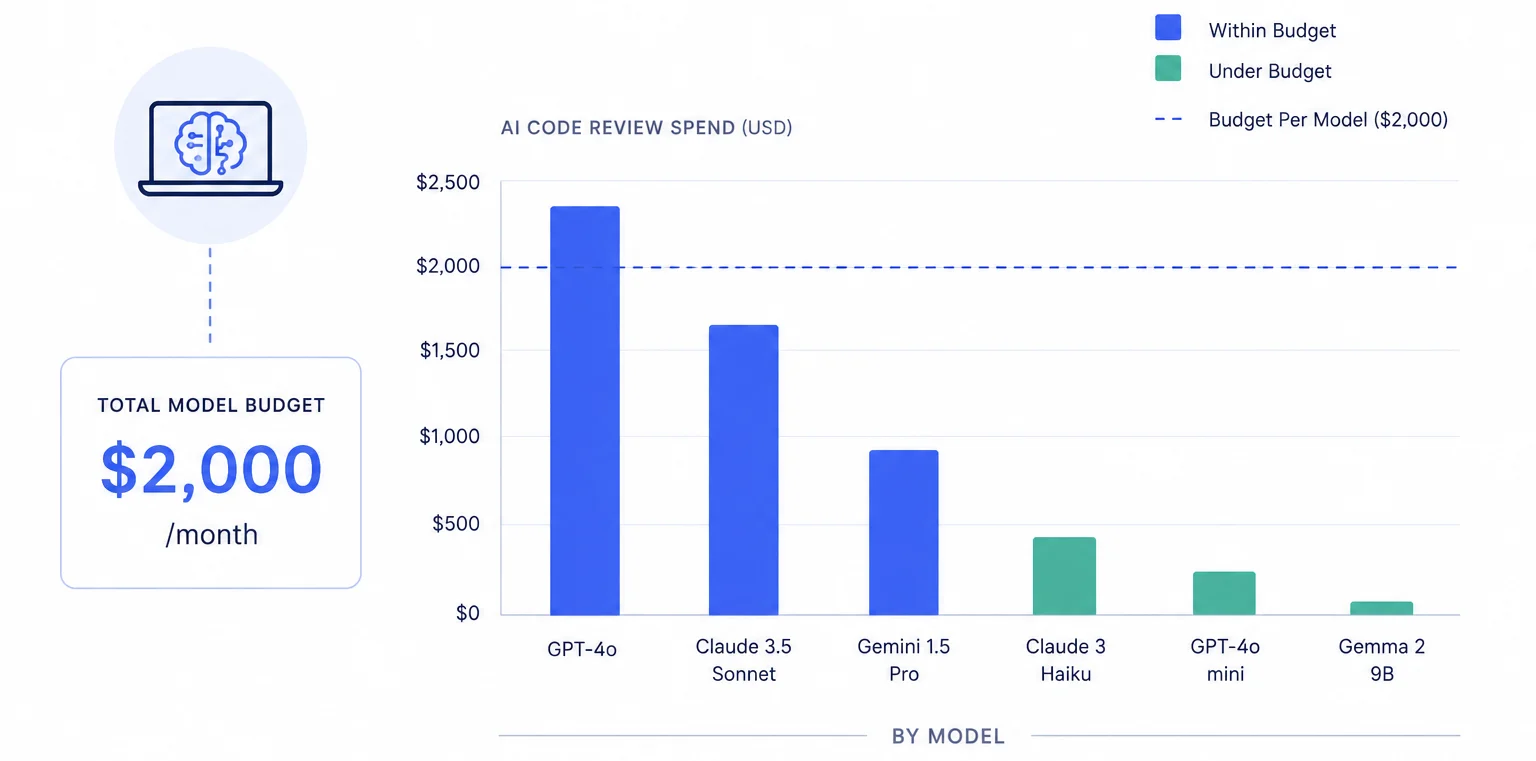
The premium-model trap
Every team that adopts AI code review goes through the same arc. Week one: wow, Claude Sonnet catches things our humans miss. Week two: let's turn it on for every repo. Week three: our OpenAI bill is $900 and half of that went to reviewing whitespace changes in package-lock.json.
The problem isn't the model. Claude Sonnet and GPT-4o are phenomenal at what they do. The problem is that most review automation treats every diff as if it deserves the same level of scrutiny. A one-line config change and a forty-file auth refactor get the same model, the same token budget, the same cost.
PURA breaks this pattern with a three-level budget hierarchy that lets you control spend at the agent, entity, and — critically — provider level. You can run Claude where it matters and Gemini where it doesn't, all within a single review agent, with automatic fallback when the premium budget runs dry.
How the provider chain actually works
Inside every PURA review agent is an ordered list of providers. Each provider block holds your API key, a list of models, and — optionally — its own daily, weekly, and monthly dollar caps. The order matters: PURA tries the first provider, checks its remaining budget, and if there's headroom, uses it. If not, it steps to the next provider in the chain.
This is not health-based failover. It's budget-based. If Claude's API is up but its monthly cap is exhausted, PURA silently moves to OpenAI. If OpenAI is also tapped out, it moves to Gemini. You get three chances to review the PR before the agent gives up and posts an exhaustion notice.
Provider budgets are optional. If you leave a provider's caps empty, it inherits the agent-level daily, weekly, and monthly budgets. Setting explicit provider caps gives you fine-grained control; leaving them unset keeps things simple.
Building a model-tier strategy
Here's a pattern that works for teams running 50–200 PRs a month. You create two review agents instead of one:
Agent 1: Premium (for high-stakes changes)
- Primary provider: Claude Sonnet, $40/month provider cap
- Fallback provider: GPT-4o, inherits agent-level cap
- Scope: budget restrictions matching teams like
platform,security— plus routing rules that sendsrc/auth/**andsrc/billing/**changes to this agent
Agent 2: Standard (for everything else)
- Primary provider: Gemini Flash, $15/month provider cap
- Fallback provider: GPT-4o-mini, inherits agent-level cap
- Scope: catch-all
*pattern on user, repo, and team restrictions
Now the routing rules do the heavy lifting. Each agent's review skill — a SKILL.md committed to your repo — carries plain-English .pura-routing instructions that decide which agents apply and which model tier each uses, based on what changed. And because each agent has its own provider chain with independent budgets, you get tiered reviews without anyone manually choosing a model per PR.
The premium agent burns Claude tokens on auth changes and billing logic. The standard agent runs Gemini on README fixes and dependency updates. Both have fallback providers, so a review never gets skipped just because one provider hit its cap. And both agents share the same account-level analytics, so your finance team sees one clean dashboard.
BYOK means the budget is real
PURA never marks up inference. Every provider call goes through your own API key — Claude calls hit your Anthropic account, Gemini hits your Google account, OpenAI hits your OpenAI account. The provider budgets you set in PURA don't control what those providers bill you; they control whether PURA dispatches a review to that provider in the first place.
This is a crucial distinction. If you set Claude's monthly provider cap to $40 and PURA hits it on the 18th, Claude won't reject subsequent calls — PURA simply stops sending them. The actual charges on your Anthropic bill will be slightly lower than $40 because PURA's cost estimates are conservative (they round up to account for thinking tokens and tool-call overhead). Your provider bill always lags reality by a few hours; your PURA dashboard is near-real-time.
Reading the provider analytics
The analytics dashboard breaks spend down by provider — you can see exactly how much each model family cost this month, how many reviews each one handled, average tokens per review, and average latency. Filter by date range, by team, by repo, or by individual agent.
The metric that matters most: provider utilization. If Claude Sonnet is at 95% of its cap by the third week and Gemini Flash is at 30%, your routing rules are doing exactly what you designed. If Gemini is at 95% and Claude is at 20%, something is misconfigured — either your routing file is sending too much to the wrong agent, or your budget caps don't reflect actual usage patterns.
This is the kind of signal you can't get from your Anthropic billing console alone. The provider console tells you what you spent. PURA tells you who spent it, on what repos, and whether that spend was appropriate for the type of change being reviewed.
Setting it up
- In the PURA dashboard, open a review agent (or create a new one).
- In the Providers section, add your first provider — paste your API key, and pick the three model tiers it should use: default, high, and low. The default model is used when no routing rule applies; routing rules select high or low when the change warrants it.
- Optionally set provider-level daily, weekly, and monthly caps. If you skip this, the provider shares the agent-level budget.
- Add a second provider as fallback. Repeat for a third if you have one.
- Create a second agent with cheaper providers and scope it to low-stakes work via budget restrictions and routing rules.
- Commit a review skill for each agent — a
SKILL.mdfile with.pura-routinginstructions describing which kinds of changes need premium vs. standard review. Plain English is fine — PURA evaluates intent, not config syntax.
Provider-and-model budgeting is where PURA diverges from every other AI review tool. Most tools give you one model, one key, one bill. PURA gives you a budget-aware provider chain with automatic fallback — so you can run the best model where it counts and the cheapest model everywhere else, with no manual switching and no surprises at the end of the month.
Ready to put your AI review spend on rails?
Install PURA on your GitHub repos and start setting budgets in minutes — not months.
Install PURA for free